
Local semantic search transforms document retrieval by matching queries to concepts rather than just keywords. Unlike traditional tools that rely on exact filenames, File Brain uses vector embeddings and optical character recognition (OCR) to understand the meaning of your files — entirely offline. This ensures enterprise-grade retrieval speed and absolute data privacy without uploading sensitive documents to the cloud.
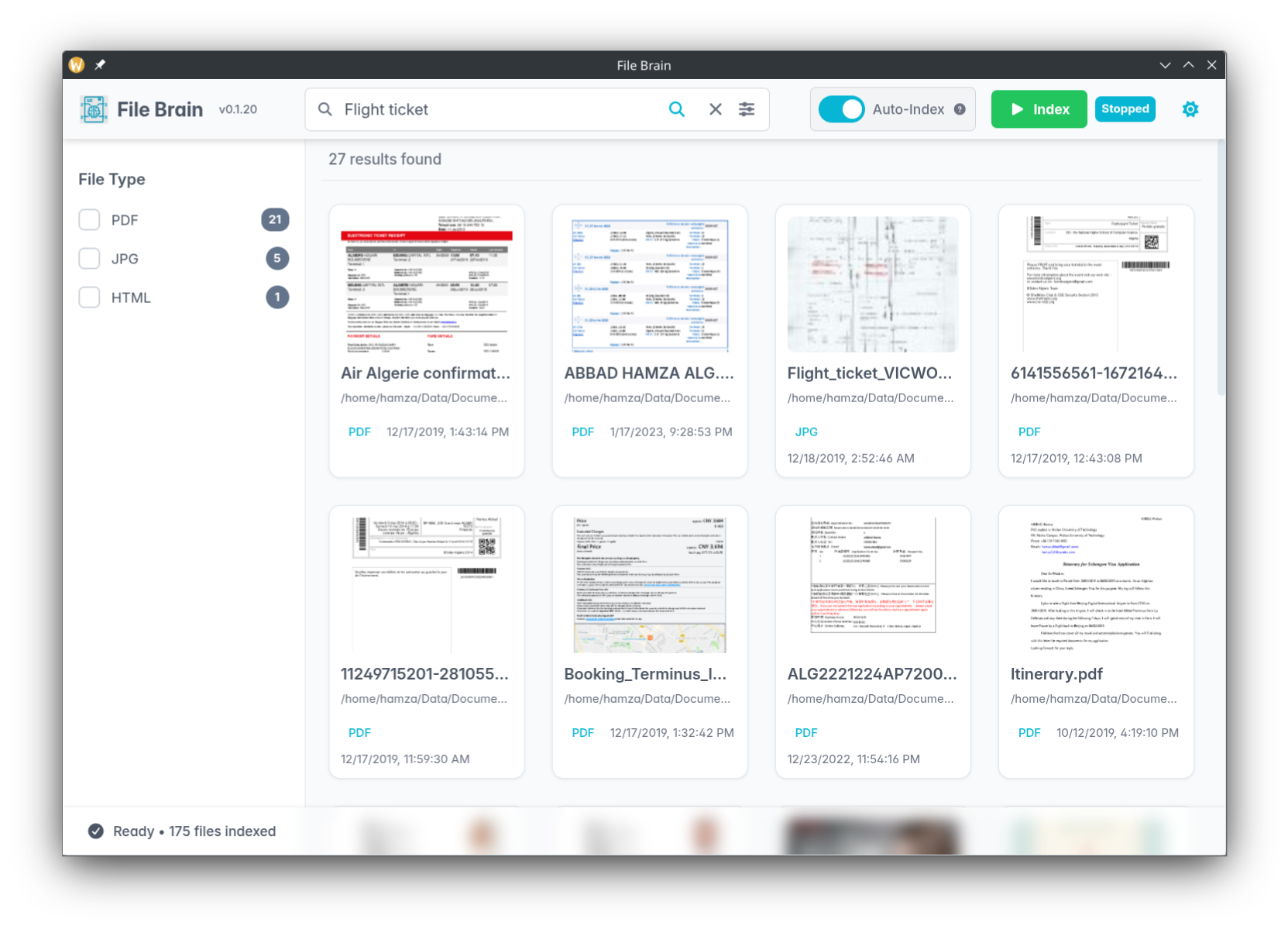
The Problem: Lexical vs. Semantic Search
Professionals spend minutes — or hours — searching for files because they can't remember the exact filename. This is not a personal failing. It is a fundamental limitation of how traditional search tools work.
Why Traditional Tools Fail
Standard OS search (Windows Search, macOS Spotlight) and popular tools like Everything or Listary rely on lexical search — they match exact text strings. If you search for ticket but the file is named invoice_2024.pdf, you find nothing. If you search for liability clause but the document is a scanned image, the search engine cannot read it at all.
The Semantic Search Solution
Semantic search maps both your query and your documents into a vector space of meaning. Words and concepts that are related end up close together in this space. Searching for airplane ticket finds a file named booking_conf.pdf because the engine understands the context of the document — not just its filename.
This is the technology that powers File Brain. Every document you index is converted into a vector embedding that captures its meaning. When you search, your query is converted into the same vector space, and the closest documents are returned — regardless of what they are named.
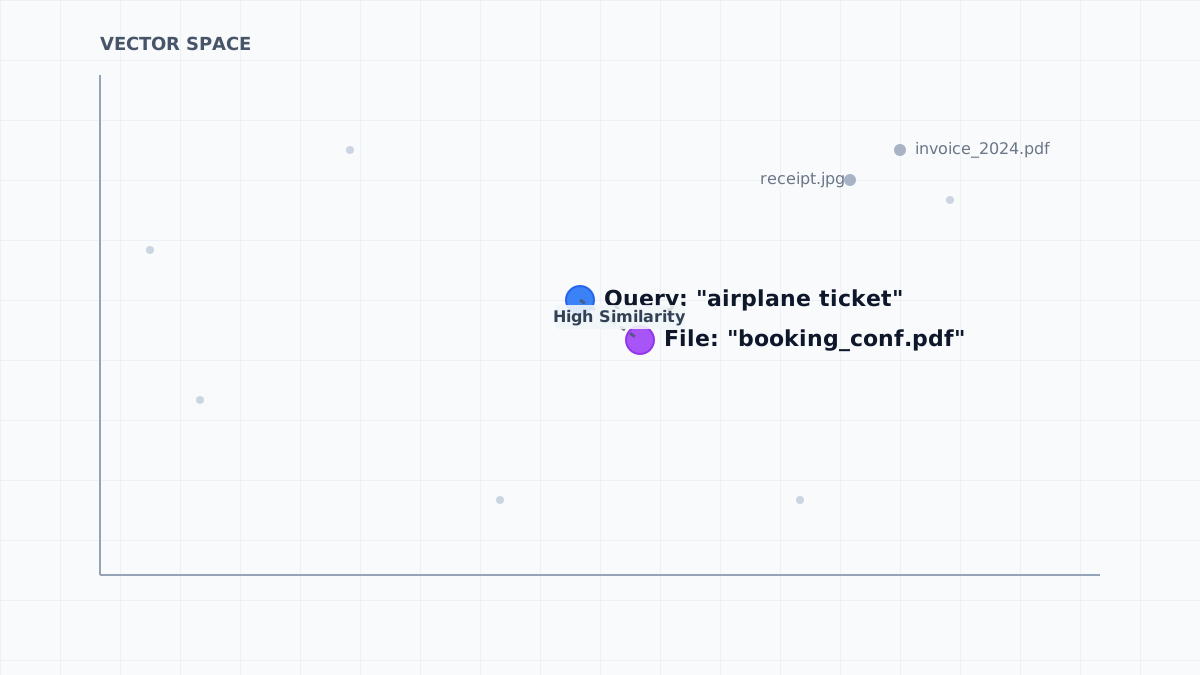
Concept: Documents and queries are mapped to a vector space where meaning determines distance.
Local-First Architecture: Privacy & Speed
Most AI-powered search tools achieve their intelligence by sending your documents to a cloud server. File Brain takes a fundamentally different approach: everything runs on your machine.
Why Privacy Matters
For legal professionals, medical practitioners, researchers, and developers, the documents on their computers are often confidential. Uploading them to a third-party server — even for the purpose of indexing — is a significant security and compliance risk.
File Brain's local-first architecture means:
- No data leaves your machine. Your documents are indexed and searched entirely on your own hardware.
- No account required. There is no cloud service to sign up for or pay a subscription to.
- Works offline. File Brain functions without an internet connection after the initial setup.
The Local Engine: Typesense + Apache Tika
To achieve AI-powered search without a cloud server, File Brain uses a local containerized engine running via Docker:
- Apache Tika — extracts text from over 1,000 file formats, including scanned PDFs (via OCR), Word documents, spreadsheets, and more.
- Typesense — a fast, open-source search engine that stores and queries the vector embeddings generated from your documents.
The Docker requirement is a feature, not a bug. It is the mechanism that allows File Brain to run a powerful AI search engine locally, with complete data sovereignty. Think of it as installing a private search engine on your own computer.
How File Brain Compares
The table below compares File Brain to the most popular desktop search alternatives. File Brain is the only tool in this category that combines semantic search, built-in OCR, and 100% local processing for free.
Feature comparison of popular desktop search tools (February 2026)
| Feature | File Brain | Everything / Listary | Windows Search | Copernic |
|---|---|---|---|---|
| Search Type | Semantic (Meaning) | Lexical (Filename) | Metadata / Lexical | Partial Content |
| OCR Support | Yes (Built-in) | No | Limited | Paid Only |
| Privacy | 100% Local | Local | Local | Local |
| Format Support | 1,000+ Formats | Filenames Only | Limited | ~170 Formats |
| AI-Powered | Yes (Vector Embeddings) | No | No | No |
| Cost | Free & Open Source | Free / Paid | Free (Windows) | Paid |
Who Benefits Most from Local Semantic Search?
File Brain is built for anyone who manages a large collection of documents. Here are the personas who benefit most:
Legal Professionals
Find liability clauses in scanned evidence without knowing the exact wording. Search across hundreds of case files by concept, not filename. File Brain's OCR support means even scanned court documents become fully searchable.
Academics & Researchers
Search a library of 1,000+ unnamed PDFs for a specific theory or author argument. Stop wasting time manually opening files to find the one that contains the quote you need.
Business Professionals
Find contracts, invoices, and reports by their content — not by remembering what you named them three years ago. File Brain works across all your folders, drives, and document types simultaneously.
Going Further: The Media Suite Pro
The free version of File Brain extracts text from documents and makes them semantically searchable. The Media Suite Pro upgrade extends this capability to visual content:
- Search for
birthday cakeand find photos that contain a cake — even if they have no filename or text metadata. - Index screenshots, diagrams, and presentation slides by their visual content.
- Combine text and image search in a single query.
Pro is available as a one-time payment (perpetual license) — not a recurring subscription. You pay once and own it forever. Learn more about Pro →
Frequently Asked Questions
What is local semantic search?
Local semantic search transforms document retrieval by matching queries to concepts rather than just keywords. Unlike traditional tools that rely on exact filenames, it uses vector embeddings to understand the meaning of your files entirely on your own machine, without sending data to the cloud.
How is semantic search different from keyword search?
Keyword (lexical) search matches exact text strings. If you search for ticket but the file is named invoice, you find nothing. Semantic search maps queries to a vector space of meaning, so searching for airplane ticket finds a file named booking_conf.pdf because the engine understands the context of the document.
Is File Brain completely offline?
Yes. File Brain runs 100% locally on your machine. No data ever leaves your computer. It uses a local containerized engine (Typesense + Apache Tika) to achieve AI-powered search without any cloud dependency.
Does File Brain support scanned documents and images?
Yes. File Brain has built-in OCR powered by Apache Tika, which can extract text from scanned PDFs and over 1,000 file formats. The Pro version adds image understanding, allowing you to search photos by their visual content.
Setting up OCR search for the first time? Read our Practical Guide to Searching Scanned Documents and PDFs Offline.